How I Actually Use TradingView
My TradingView setup has two jobs. First: charting USDJPY for my systematic momentum strategy running live on Interactive Brokers. Second: monitoring crypto across BTC, ETH, and the altcoins I trade on Hyperliquid.
These are different use cases. One is slow and methodical — I'm looking at daily/weekly charts, checking 60-day momentum and MA deviation. The other is reactive — I need to see 15-minute candles fast when a position is moving.
TradingView handles both better than anything else I've tried. I've used MetaTrader 4, MetaTrader 5, ThinkorSwim, and cTrader. None of them come close on charting quality, community indicators, or cross-asset coverage.
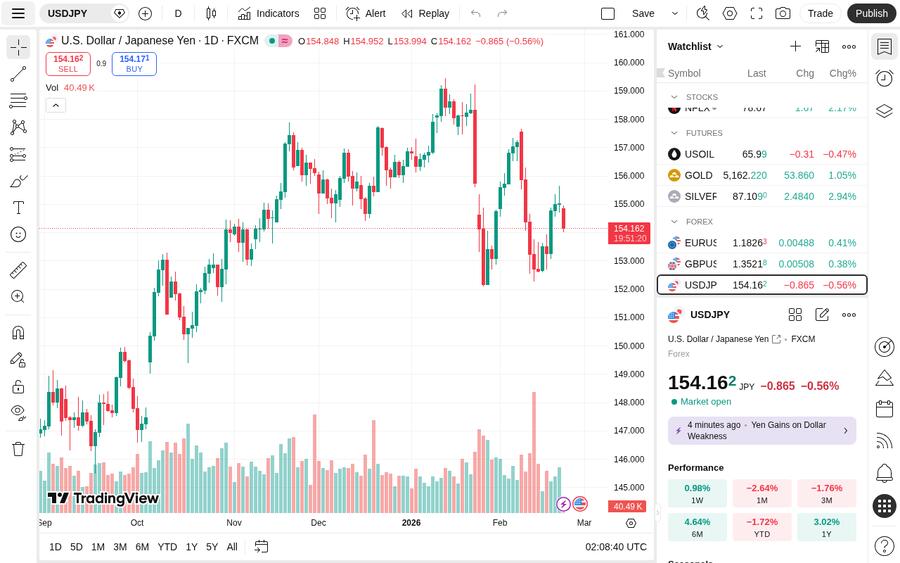
The Setup That Works
For systematic forex trading, my USDJPY workspace looks like this:
- Main chart: Daily timeframe, USDJPY
- Indicators: 60-day momentum (custom Pine Script), MA20 deviation %, 4.12% carry rate overlay
- Alerts: Price level breaks, momentum threshold crosses — saved to cloud so they persist across sessions
- Second pane: Correlation with DXY to catch divergences
One underrated feature: synced chart layouts across devices. I set up a workspace on my desktop at home, and it's ready on my laptop when I travel. Indicators, drawings, templates — everything follows. MetaTrader does not do this; you're locked to the machine where you configured it.
Pine Script: Worth the Learning Curve
My momentum signal for the IB strategy is a custom Pine Script indicator. Writing it took about 3 hours across two evenings. What it does:
1. Calculates 60-day rate of change
2. Compares current price to 20-day MA, outputs deviation % 3. Plots seasonal overlay (months where USDJPY historically trends) 4. Color-codes bars based on signal confluenceIs Pine Script perfect? No. The documentation is inconsistent, and the language has its quirks — especially around scoping and request.security() behavior. But it's the only language that lets you backtest, visualize, and alert — all in one place, free. I've tried QuantConnect, Backtrader, and custom Python. For visualization and rapid iteration, Pine Script is unmatched.
If you're just starting, I wrote a Pine Script beginner guide that walks through your first indicator step by step. Once you're comfortable, you can tackle more complex builds like an RSI divergence indicator or a moving average crossover strategy.
Pine Script v5 vs v6: TradingView recently launched Pine Script v6, which introduces new features likerequest.footprint() for volume footprint analysis. If you have existing v5 scripts, check our v5-to-v6 migration checklist before upgrading — some things break.
AI-assisted Pine Script: For traders who don't code, tools like Pineify and ChatGPT can generate Pine Script from natural language descriptions. They work for simple indicators but struggle with complex multi-condition logic — worth trying for a quick prototype.
Alerts: The Feature That Actually Earns the Upgrade
This is where free users get hurt. 3 alerts on the free plan. For a systematic strategy, that's barely enough.
Like what you're reading? Try it yourself — this link supports ChartedTrader at no cost to you.
Try TradingView Free →I run:
- 3 alerts on active USDJPY levels (support/resistance, MA cross)
- 2 alerts on BTC/ETH for my HL positions
- 1 alert on USDJPY for fundamental surprise risk
Alert types matter too. The difference between "once per bar" and "once per bar close" is subtle but critical — the wrong setting will fire false signals mid-candle.
Webhook alerts (Plus plan and above) let you pipe TradingView signals directly to automated systems. You can connect alerts to OKX's Signal Bot for automated crypto trading, or wire them to your own Python execution layer for IB orders.Pricing Breakdown (2026)
| Plan | Monthly Price | Annual (per month) | Alerts | Indicators/chart | Best For |
|---|---|---|---|---|---|
| Free | $0 | $0 | 3 | 2 | Learning, casual browsing |
| Essential | $14.95/mo | ~$12.95/mo | 20 | 5 | Active retail traders |
| Plus | $29.95/mo | ~$24.95/mo | 100 | 10 | Multi-strategy, webhook users |
| Premium | $59.95/mo | ~$49.95/mo | 400 | 25 | Professional traders |
| Expert | $239.95/mo | ~$199.95/mo | 1,000 | 50 | Institutional, prop desks |
Desktop App vs Web
TradingView offers both a desktop app and a web version. The desktop app supports native multi-monitor setups with separate windows (not just browser tabs). For serious charting across 2-3 screens, the desktop app is noticeably smoother.
The web version is fine for single-monitor use and has the advantage of working on any machine without installation. Both share the same account, layouts, and alerts.
What TradingView Doesn't Do Well
Execution: TradingView can route orders to selected brokers (including OKX for crypto), but not to Interactive Brokers. For IB users, you chart on TradingView and execute separately. This isn't a dealbreaker — it's a charting tool first — but it means context-switching between platforms. Data history: On the free tier, historical data is limited to 5,000 bars. For backtesting strategies that need deep history, you need to upgrade. My 60-day momentum calculation uses about 90 days of daily data — fine even on free. But if you're building a backtesting strategy on hourly data, you'll hit the limit fast. Real-time for some assets: Crypto and FX are real-time on the free plan. Stock data on certain exchanges (NYSE, NASDAQ) requires paid market data subscriptions. For my use case (USDJPY + crypto), the free real-time data is sufficient. Social network noise: TradingView's Ideas section is filled with low-quality "BTC to $100K" predictions. The signal-to-noise ratio is poor. The community indicators, however, are genuinely useful — just ignore the social feed.How TradingView Compares to Alternatives
| Feature | TradingView | MetaTrader 4/5 | ThinkorSwim | cTrader |
|---|---|---|---|---|
| Cross-asset coverage | Stocks, FX, crypto, futures | FX, CFDs only | US stocks, options, futures | FX, CFDs |
| Custom scripting | Pine Script | MQL4/MQL5 | thinkScript | cAlgo (C#) |
| Cloud sync | Yes | No | Yes | Limited |
| Community indicators | 100K+ | ~10K | ~500 | ~2K |
| Free tier | Yes (limited) | Free (broker-tied) | Free (TD account) | Free (broker-tied) |
| Broker integration | ~15 brokers | Broker-native | TD Ameritrade only | Broker-native |
Who TradingView Is For
Systematic traders: If you build and test strategies with custom indicators, TradingView's Pine Script + built-in backtester is the fastest iteration loop available at retail level. Multi-asset traders: If you trade FX on IB and crypto on OKX or Hyperliquid, TradingView is the only platform that charts both in one workspace. No need for MetaTrader AND a separate crypto charting tool. Beginners: The free plan is genuinely usable for learning. You can explore charts, write basic indicators, and paper trade before committing money. Who should look elsewhere: If you only trade MT4/MT5 through a specific broker and never touch crypto or stocks, MetaTrader's tight broker integration might serve you better. But for everyone else, TradingView is the default.Mobile Experience
TradingView's mobile app (iOS and Android) is one of its strongest features. Charts render cleanly, all your saved layouts sync, and alerts push to your phone natively. I use it primarily for monitoring — checking USDJPY levels when I'm away from my desk, or quickly scanning BTC price action before the AI opens a position.
The mobile app supports drawing tools, indicator overlays, and even Pine Script strategy results. You can't write Pine Script on mobile, but you can view and modify alerts. For a trader who needs to stay connected without being chained to a desktop, it's the best mobile charting experience available.
Verdict
TradingView is not optional if you're a serious trader. It's the one platform that gives you professional-grade charting, scripting, and alerts — at a price that doesn't require institutional backing.
For USDJPY systematic traders: Essential plan ($14.95/mo) is all you need. For crypto + forex active traders: Plus ($29.95/mo) once you're running multiple alert sets and want webhook automation. Start free, build your workspace, write your first Pine Script indicator. Upgrade when you hit the alert wall — and you will hit it. Try TradingView →---
*This article contains affiliate links. If you sign up through our links, we may earn a commission at no extra cost to you.*